
The benefits of using SCORM Cloud Dispatch
-
Deliver your content to any LMS on the market
Just because an LMS claims to support SCORM doesn’t always mean it’s up to spec. By using SCORM Cloud Dispatch, you control how your content is delivered and tracked, using the best-in-class SCORM Cloud player. Dispatch files are tiny SCORM 1.2 packages that virtually any SCORM LMS can handle.
Learn how -
Easily manage content updates and versions
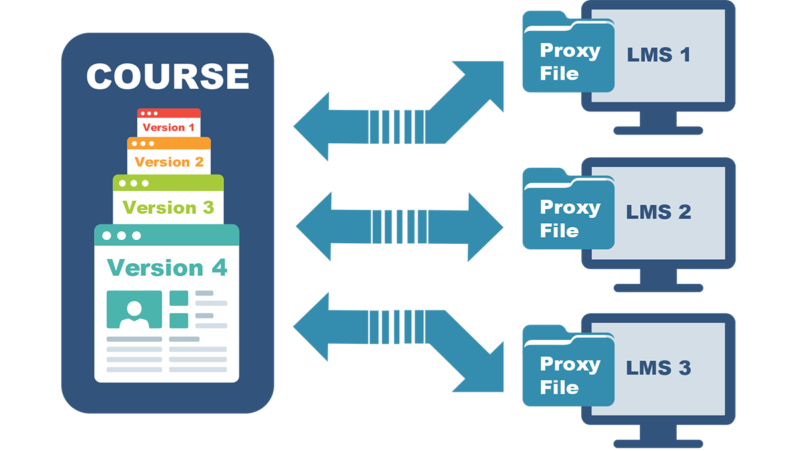
There is no need to send new course files to every LMS in your network each time you update your content. With SCORM Cloud Dispatch, all you need to do is add a new version of your course to SCORM Cloud and it will automatically update across all of your LMSs. You can even decide how to handle in-progress registrations, choosing whether users must start over or can continue on with the previous version.
Learn how -
Play SCORM 2004, xAPI, Videos and more in a SCORM 1.2 or LTI LMS
SCORM Cloud Dispatch handles the details of standards compatibility so that you don’t have to. Simply upload any SCORM 1.2, 2004, xAPI, cmi5, MP4 or PDF files to SCORM Cloud, and create the Dispatch package to share with your client as a SCORM 1.2 file or via LTI. Using Dispatch lets you determine the best standard or format to use for your content without having to worry about whether your client’s LMS can support that standard.
Learn how -
Understand course usage across LMSs
Using SCORM Cloud Dispatch, you have the benefit of accessing reports on how your content plays in SCORM Cloud, which dives into course completion, question-level details and more. You’ll also be able to see how your courses are used in every LMS you send a Dispatch file to. Consolidated reports allow you to understand usage patterns and make strategic decisions about how to make your content more awesome. Or you can drill down to learner level details.
Learn more
How SCORM Cloud Dispatch works
Using the SCORM Cloud web application, you can create a Dispatch package (SCORM 1.2 or LTI) of your course, which is a shell of a SCORM, cmi5, xAPI AICC, PDF or MP4 file that can be imported into any LMS, just like any other SCORM package. When the LMS launches the dispatched shell package, SCORM Cloud loads your content inside the shell to play and track your courses directly in SCORM Cloud. Dispatch packages report high-level results to the LMS and keep detailed results in SCORM Cloud, all while keeping your courses on SCORM Cloud servers. With SCORM Cloud Dispatch, you maintain complete control over course access, version management and reporting.
Get started for free
See how others are using Dispatch
Content publishers around the world use SCORM Cloud Dispatch to distribute their courseware to third-party LMSs. These success stories cover the challenges our clients faced and the results they achieved using SCORM Cloud Dispatch.
Check out their stories
Get started with SCORM Cloud
Ready to see if SCORM Cloud Dispatch is right for you? Sign up for a free trial of SCORM Cloud today to start sharing course access with your LMS clients.
Try SCORM Cloud freeQuestions? Ask us anything.
Want to learn more about using SCORM Cloud or another product? Get in touch!